
TV Service Menu Codes for All Brands & Boards (2026)
Quick Summary: Comprehensive bench directory of factory service menu codes and emergency master reset procedures for Samsung, LG, Sony, TCL, Philips, Hisense, Vizio, and over 80+ television brands. Includes universal motherboard chassis sequences (Menu 1147, Input 2580, Menu 8202) for repairing inverted panel displays, LVDS mapping solarization, and retail store demo lockouts.
Every bench technician knows the situation: a television comes across the workstation with an upside-down display after a mainboard replacement, washed-out solarized colors (LVDS mapping mismatch), or trapped in a retail shop demo loop.
Before desoldering the SPI flash IC or hooking up an RT809H programmer, your fastest line of repair is almost always the Factory Service Menu.
This manual contains verified, real-world service codes compiled from workbench service manuals, factory engineering sheets, and universal board decoders.
⚠️ Workshop Safety Warning Before Proceeding
1. Take a photo of every menu page before altering a single parameter.
2. Never alter the Panel ID or Project ID blind. Choosing an incompatible display timing will cause an instant black screen or an unrecoverable restart loop.
3. If the screen ever displays cycling solid red, green, blue, and white screens, you have activated Panel Aging (Burn-in) Mode. Power down the set using the physical power switch or unplug the AC cord for 60 seconds to escape it.
Why Board Codes Matter More Than Brand Names
If you are working on modern budget Smart TVs (Intex, Lloyd, Sansui, Coby, Element, Westinghouse, Sceptre, Micromax), the brand printed on the front bezel is essentially a badge.
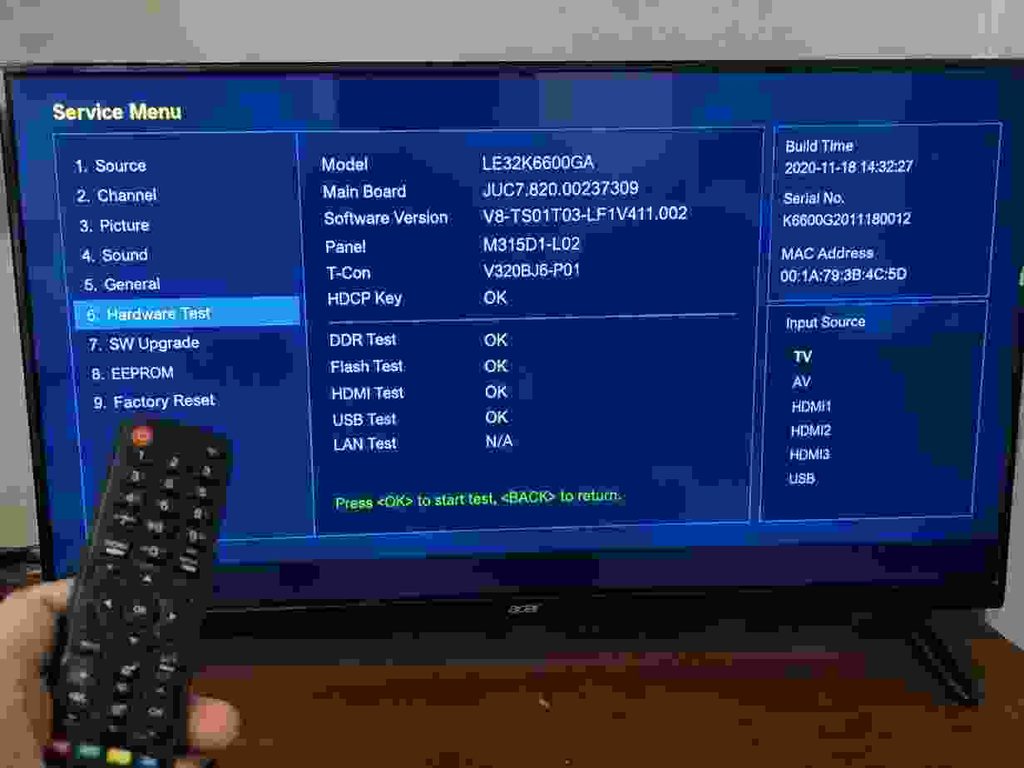
Under the hood, 90% of these sets use generic scalers and mainboards engineered by MStar/Sigmastar, RealTek, MediaTek, or Novatek. The service menu sequence is wired directly to the motherboard firmware, not the television badge. If your brand code fails, open the chassis back cover, read the white silkscreen board number on the PCB (e.g., TP.HV320.PB801 or CV56BH.Q42), and jump directly to Part 3.
Part 1: Service Menu Codes by Television Brand
Unless noted otherwise, perform these keypad sequences with the television powered ON, pointing the remote directly at the IR sensor in rapid succession (within 2 to 3 seconds).
AKAI
- Method 1: Press
Menu→ Enter1979. - Method 2: Press
Menu→ Enter8202. - Exit: Switch the TV into Standby using the remote.
AOC
- Press
Menu→ Enter1999.
Changhong / Ruba
- Source Methods: Press
Source(orInput) → Enter3138,1125,42580, or3130. - Menu Methods: Press
Menu→ Enter1125,1147,2580, or0816.
Coby
- Method 1: Press
Menu→ Highlight Audio (do not enter) → Enter8893. - Method 2 (LED chassis): Press
Source→ Enter2580→ Navigate to Other Setting → Select Shipment → Choose Yes. Power cycle the unit to save.
Daewoo
- Press
Source→ PressRight Arrow→ PressDown Arrow.
Dell Displays & TVs
- Code Sequence: Press
Menu→ Enter3355. - Hardware Override: With the unit on, press and hold the
Input/Sourcebutton on the frame. Press and releasePower(screen drops), pressPoweragain (screen returns), and continue holdingInputfor 10 seconds until “TV has been reset” appears.
Dynex
- Method 1: Press
Input→ Enter2580. The onscreen volume slider snaps to 50%, the TV reboots and brings up the factory OSD. - Method 2: Press
Menu→ Enter1999→ PressEnter.
Haier
- Method 1: Press
Menu→ Highlight Audio → Enter8893→ PressOK. - Universal Haier Board Codes:
Menu 1147,Menu 8202, orMenu 4578. - Exit: Press
Exitor power down into standby.
Hisense
- Standard OSD: Open Menu → Sound → Set Balance slider to exact
0→ Input0532. The factory engineering OSD will load. - Parental Lock Bypass: Navigate to Settings → Parental Control → enter master pass
0000→ Select Clean All.
Hitachi
- Method 1: Press
Menu→ PressMenu→ Press8→ PressSelect. - Hardware Method (No Remote): TV in standby. Hold the physical
Inputkey on the TV frame while pressingPoweruntil the service matrix displays.
Insignia
- Press
Input→ Enter2580. - Alternative: Turn volume down to
0, then immediately pressInput→9876→OKwithin 5 seconds.
LG Electronics
- Method 1 (Dual Key): Press and hold the physical
OKbutton on the TV chassis AND theOKbutton on the factory remote simultaneously for 6 to 8 seconds. - Method 2 (Menu Key): Hold
Menuon the remote andMenuon the set until the 4-digit security challenge appears. - Master Passwords:
0000,0413,8741,8743,7777, or8878. - Service Menu Tweaks:
- USB Media Enable: Set
Tool Option→USBto1. - Hotel Mode Disable: Set
Hotel Mode/Hospitality Modefrom1to0.
- USB Media Enable: Set
- Emergency USB Firmware Force: Put the matching
.epkfirmware inside a clean folder namedLG_DTVon a FAT32 USB drive. Go to Settings → highlight Option (do not click OK) → tap the number7seven times on the remote.
Micromax
- B-Series:
Source→2580 - C-Series:
Source→3138 - K-Series:
Menu→ Sound → Balance →1969 - 32T & Standard Series:
Menu→1147 - 40T Models:
Menu→ Highlight Contrast → Enter9735
Panasonic (Viera LCD, OLED & Plasma)
- Factory Self-Check Reset: With the set turned on, hold the
Vol (-)button on the TV frame while holding theMenubutton on the remote for 5 seconds. Once the self-check diagnostic table reads all “OK”, pull the main AC cord. - Bench Service Mode: Hold
Vol (-)on the television frame, then pressRecall(orInfo) on the remote 3 times. Use keys1and2to browse blocks, and3and4to select adjustments. PressPowerto store values into NVRAM.
Philips
- CSM (Customer Service Mode – Read Only):
123654 - SAM (Service Alignment Mode):
062596followed byInfo(orMenu). - Factory Reset Sequence:
Menu→Features→Software Info→ Input062597→Info. - Master Child Lock (V-Chip Override):
0711(enter twice if prompted).
Samsung
- Standby Service Sequence (Standard): Put TV in Standby → Press
Mute→182→Power. - Standby Service Sequence (Alternative): In Standby → Press
Info→Menu→Mute→Power. - European Chassis Sequence: In Standby → Press
Display→P.STD→Mute→Power. - Instant Factory Reset (Without Menu): Turn TV on. Point the remote and hold the
Exitbutton continuously for 15 seconds until the factory warning prompt loads, then choose OK.
Sharp
- Service Mode Entry: Disconnect the AC power cord. Hold
InputandVol (-)simultaneously on the physical TV buttons while reconnecting the power cord. Keep holding until a blue or white[K]character shows in the corner. Then pressVol (-)andCH (-)together to reveal the factory diagnostic matrix.
Sony (Bravia & Master Series)
- Standby Sequence: Put TV in Standby → Press
Display(ori+) →5→Vol (+)→Power. - Panel Hours Check: In Standby → Press
Display→5→Vol (-)→Power. The hours counter displays in hex/decimal at the bottom left. - Saving Settings: Press
Mutefollowed byEnter(0) to commit parameters to EEPROM.
TCL
- Method 1: Open
Menu→ Navigate to Picture → Highlight Contrast → Enter9735(or1950). - TCL Android / Google TV Recovery Mode: Go to Settings → System → About → On the remote, press:
Up,Right,Down,Right,Up,Fast Forward(3 times),Rewind(2 times), then theBackarrow.
Toshiba
- Method 1: Press
Menu→ Highlight Picture → Enter9301. - Method 2 (Direct): Press
Muteon remote, release, pressMuteagain and keep holding it down while pressing theMenubutton on the television set. AnSwill appear in the upper-right corner.
Vizio
- Method 1: Turn the TV off. Press and hold
CH (+)andCH (-)on the television frame, tapPoweron the frame, and release all three. Now pressMenuon the remote control. An “F” icon will flash on the screen. Press and holdMenufor 5 seconds to load factory settings. - Master PIN: If parental lock is engaged, enter master PIN
0000.
Part 2: Universal Service Codes (Generic Chinese Boards)
If working on unbranded or regional white-label sets, cycle through these primary universal combinations:
| Master Trigger Key | Digit Combinations to Test |
|---|---|
| Menu | 1147 (Most Common), 8202, 2580, 1950, 2008, 0000, 9735, 8896, 7710, 9301, 4725, 2588, 6483 |
| Input / Source | 2580 (Most Common), 1147, 3195, 3138, 0000, 208, 308, 2588, 6483 |
| Mute | 6483, 1147, 2580 |
Part 3: Service Codes Mapped by Motherboard Chassis
When the brand sequence fails, open the back panel and find the silkscreen number etched on the green or black PCB:
| Motherboard Number | Processor / Architecture | Factory Sequence |
|---|---|---|
| T.VST59.031 / A81 | MStar TSUMV59 | Menu + 1147 |
| TP.VST59S.PB813 | MStar TSUMV59X | Menu + 1147 |
| TP.HV320.PB801 | MStar TSUMV59 | Menu + 1147 |
| T56J.11.2 | TSUMV56 | Menu + 1147 or Input + 2580 |
| T.MS18VG.72 / 81B | MStar MST18 | Menu + 1147 |
| TP.MS338.PC821 | Android Smart (MSD338) | Menu + 1147 |
| TP.MS1306.PB772 | MStar Android | Menu → Picture → Contrast → 9735 |
| CV182L_B / CV181L-Y | MStar Scaler | Input + 2580 |
| CV56BH.Q42 | TSUMV56 | Input + 2580 |
| CV309H-X | MStar | Source + 2580 |
| VS.Tp53U71.2 / U61.2 | V53 Scaler | Input + 208 |
| LAD.MV59S.G | MStar Scaler | Menu + 7710 |
| 5800-A8M260-0020 | Skyworth OEM Board | Source + 3195 |
| 35017414 / 35016445 | MediaTek MT8227 | Menu + 2008 (within 3 seconds) |
| JUG7.820.531-3 | MStar MST719 | Input + 3138 |
| 40-T31TOT-MAB2HG | TCL OEM Chassis | Menu → Contrast → 1950 / 9735 |
Part 4: Model-Specific Code Tables
Intex LED Models
| Service Code | Compatible Intex Models |
|---|---|
| Menu + 1147 | LED-2200FHD, LED-2202 FHD, LED-2400 HD, LED-2800, LED-3107, LED-3207, LED-3199 GOLD, LED-3210, LED-3900 FHD, LED-2011 (19.5″), LED-2111 (20.7″), Splash-800, LED-2810 |
| Menu + 8202 | LED-2410, LED-2412, LED-3110, LED-4000FHD, LED-4200FHD, LED-4010FHD, LED-5000FHD, LED-4300FHD, LED-5010FHD |
| Menu + 8896 | LED-1602, LED-1602N, LED-1902 |
| Input + 2580 | LED-1600, LE19HD08-B013, LED-40FHD10-VM, LED-3105T |
| Source + 6964 | LED-1611-VT13, LED-2110, LED-2203FHD |
Mitashi LED Models
| Service Code | Compatible Mitashi Models |
|---|---|
| Source + 2580 | MiC019V01, MiC022V01 |
| Menu + 2580 | MiC032V01, MiC019V04, MiC022V04, MiC024V04, MiE022V04, MiE024V04, MiC032V04, MiC040v01 FHD |
| Menu + 7168 | MiC022V02, MiC022V03, MiE022V01 |
| Menu + 8222 | MiC032V02, MiE032V01, MiC032V07 |
| Menu + 1147 | MiE022v01, MiC019V07, MiC022V07, MiC024V07, MiE032v08, MiC040v01-EL, MiDE032v06, MiDE039v06 FHD, MiDE032v05, MiDE039v05, MiE019v08, MiE024v08/v09/v10 FHD, MiDE050v05 FHD |
| Menu + 0000 | MiE024V01, MiE019v05, MiE022v05 FHD, MiE023v05, MiC022v05, MiC032v05, MiE032v02 FHD, MiE040v01 FHD, MiDE032v09, MiDE065v09 FHD |
How to Clear Store, Shop & Demo Modes
If a television displays promotional banners around the screen borders or resets volume and picture tweaks every 15 minutes, it is locked in Commercial Store/Demo Mode.
- Samsung: Open Menu → Setup (or Support) → Select Plug & Play (or Home Mode). Quick Toggle: Press the physical Volume button on the TV frame, then hold the physical
Menubutton for 7 seconds until “Dynamic” flashes on the display. - LG: Open Settings → Option → Mode Setting → Change from Store Demo to Home Use. If locked by hospitality setup, enter service menu and set
Hotel Mode = 0. - Sony: Press
Home→ Settings → Set-up → Auto Start-up → Reconfigure location to Home. - Philips: Press
Menu→ Installation → Preferences → Location → Set to Home.
Bench Troubleshooting: How to Fix Common Service Menu Mistakes
1. Inverted or Mirror Display (Upside-Down Screen)
This happens when replacement universal boards are set to ceiling-mount configuration by default.
Fix: Enter Service Menu → Navigate to Panel Settings (or Special Setting) → Locate Mirror Mode (or Flip, H-Mirror, V-Mirror) → Change setting from Off to On (or HV_Flip) → Power down the set with the remote to write the register.
2. Washed Out, Solarized Colors (LVDS Map Error)
If the image looks like an over-exposed photo negative with blotchy skin tones, the motherboard output standard does not match the T-Con board.
Fix: Enter Service Menu → Go to Panel Settings → Locate LVDS Map (or TI/JEIDA format, LVDS Format, or Bit Depth) → Switch value between VESA and JEIDA (or toggle between 8-bit and 10-bit).
3. Screen Trapped in Red / Green / Blue / White Aging Loop
Fix: The scaler is in self-test mode. Unplug all video inputs (HDMI, Cable). Point the original remote at the unit and press the Power button repeatedly. If unresponsive, cut AC power for 5 minutes, reconnect power, and hold the physical Menu or Input key on the TV frame while powering on.
Frequently Asked Questions (Technician Q&A)
What is the most common universal TV service code in the world?
Menu 1147 is by far the most widely deployed service key across MStar and Novatek chassis worldwide, followed closely by Input 2580 and Menu 8202.
Will a factory reset in the service menu erase my firmware?
No. A factory reset wipes user settings, cached app states, and NVRAM channel maps, restoring factory default configuration tables. It does not erase or downgrade the core bootloader or kernel partitions.
How do I fix an upside down or inverted TV picture in the service menu?
Enter the service menu using your chassis code, navigate to Panel Settings, locate the Mirror Mode or Flip option, change it from Off to On (or HV_Flip), and power down the TV with the remote to save the new setting.
How do I fix solarized or negative colors after replacing a TV motherboard?
Open the service menu, select Panel Settings, and switch the LVDS Map (or TI/JEIDA format) between VESA and JEIDA standards until the color output matches the display panel.
What should I do if the service menu password was changed by a customer?
On Android and Smart TV mainboards, an altered security PIN can be bypassed by performing a forced recovery cache wipe. For non-smart boards, look for the 8-pin EEPROM chip (usually 24C32 or 24C64) near the scaler IC. Bridging the SDA and SCL pins (Pins 5 & 6) momentarily to ground during AC bootup forces the scaler to initialize with default register values.
Need Board-Level Firmware or Verified Program Binaries?
If a service menu sequence cannot revive the set due to corrupted NAND memory, an AVB security halt, or a frozen bootloop, the firmware must be flashed directly via USB or chip programmer.
You can lookup exact model firmware binaries, tested panel configurations, and engineer schematics directly on Ambi Support Firmware Repository or connect with our workshop engineers via Ambi Support WhatsApp Helpline.
Explore the Ambi Support Database
Access our verified repository of Smart TV USB firmware binaries and technician troubleshooting guides.
Need Direct Technician Assistance?
Connect with certified TV technicians for motherboard matching, bootloop troubleshooting, and verified USB firmware guidance.